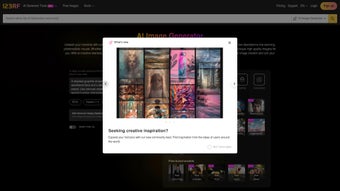

Download 123RF AI Image Generator – Free AI‑powered Image Creation Tool for Marketing, Social Media & Design
Overview – What Makes 123RF AI Image Generator Stand Out?
The 123RF AI Image Generator is a web‑based, subscription‑friendly application that lets you turn plain text prompts into high‑resolution, royalty‑free visuals in seconds. Powered by cutting‑edge deep‑learning models, the service interprets descriptive language, perspective cues, and style preferences to produce four distinct preview images per request. After reviewing the previews, you can select the best match and download it with a commercial‑ready license worth up to $25,000. This eliminates the need for costly stock‑photo purchases or lengthy photoshoots, making it an essential tool for marketers, content creators, and designers who need fresh imagery on tight deadlines.
Key Benefits at a Glance
- Instant generation of four unique images per prompt, saving time and effort.
- Full commercial license (up to $25,000) included with each download, ensuring legal peace of mind.
- Fine‑tuned control over perspective, subject, and artistic style for brand consistency.
- Seamless integration with existing 123RF accounts, especially for active subscribers.
- Daily generation limits that promote fair usage while still supporting heavy creators.
- Web‑only interface – no software installation required, works on any modern browser.
- Secure, GDPR‑compliant data handling and encrypted image delivery.
Beyond the obvious time savings, the AI Image Generator opens creative doors that traditional stock libraries simply cannot match. Need a futuristic cityscape for a tech blog? Just type “futuristic skyline at sunset, cyberpunk style, aerial view,” and let the algorithm do the heavy lifting. The result is a unique, brand‑safe image that no other competitor can replicate. Because the tool is hosted in the cloud, updates and model improvements happen automatically – you always work with the latest AI capabilities without manual patches.
Security is another cornerstone of the platform. All image requests are processed over HTTPS, and any user‑provided data is stored only for the duration of the session before being purged, aligning with GDPR and CCPA standards. Moreover, the built‑in licensing framework removes the ambiguity that often surrounds AI‑generated content, giving businesses the confidence to use images across ads, websites, and printed collateral without fearing infringement.
From a workflow perspective, the generator integrates smoothly with popular project management tools via simple copy‑and‑paste URLs, and the high‑resolution output (up to 4K) ensures that designers can upscale or adapt assets without loss of quality. Whether you’re drafting a quick social media post or assembling a full‑scale marketing campaign, the 123RF AI Image Generator offers a scalable, cost‑effective solution that keeps your visual pipeline flowing.
Installation & Usage – Step‑by‑Step Guide to Creating Your First AI Image
Getting started with the 123RF AI Image Generator is intentionally straightforward. Since it is a web‑based platform, there is no traditional installation process; you only need a stable internet connection and a compatible browser. Below is a detailed walkthrough from account creation to downloading your licensed image.
1. Account Setup and Access
- Visit 123rf.com/ai-image-generator and click “Sign In” or “Create Account.”
- If you already have a 123RF subscription, log in with your existing credentials. New users can register with an email address, Google, or Facebook account.
- Navigate to the “AI Image Generator” tab in the dashboard. Users with active subscriptions or recent credit purchases will see a green “Generate Images” button.
2. Crafting the Perfect Prompt
Effective prompts are the heart of AI‑generated art. The interface provides four optional fields to help you shape the output:
- Subject: What is the main focus? (e.g., “a smiling barista,” “vintage motorcycle”).
- Perspective: Choose camera angle or viewpoint (e.g., “bird’s‑eye view,” “close‑up”).
- Style: Define artistic direction (e.g., “watercolor,” “cinematic lighting”).
- Additional Details: Add mood, color palette, or environment (e.g., “golden hour, misty forest”).
Combine these elements into a concise sentence, such as: “A cheerful barista serving latte art, close‑up, modern flat‑design style, warm pastel colors.” Press “Generate.”
3. Reviewing and Selecting Previews
Within seconds, the AI produces four variations based on your prompt. Each preview includes a thumbnail, resolution indicator, and a short description of the applied style. Click any image to enlarge it, compare details, and decide which best fits your project. If none are satisfactory, you can tweak the prompt and regenerate without penalty (subject to daily limits).
4. Downloading with a Commercial License
Once you’ve chosen an image, click “Download.” The system automatically attaches a downloadable license PDF that grants commercial usage rights up to $25,000. The image file is delivered in high‑resolution PNG or JPEG format, ready for immediate upload to websites, social media posts, or print collateral.
5. Managing Daily Limits and Credits
Standard accounts receive a modest daily quota (e.g., 10 image sets). Power users can purchase additional credits or upgrade their subscription to raise the limit. All usage statistics are visible in the account dashboard, helping you monitor consumption and plan future projects efficiently.
Overall, the process is designed for speed and simplicity. Whether you are a seasoned designer or a small‑business owner with limited design resources, the AI Image Generator delivers professional‑grade visuals without the steep learning curve associated with traditional graphic software.
Compatibility, Pricing, Pros & Cons, and Frequently Asked Questions
Operating System Compatibility
Because the 123RF AI Image Generator runs entirely in the browser, it is compatible with any modern operating system that supports HTML5, including Windows 10/11, macOS Monterey and later, Linux distributions, as well as mobile platforms like Android 8+ and iOS 13+. Recommended browsers are Chrome, Firefox, Edge, and Safari for optimal performance.
Pricing Structure
The tool is offered as part of the broader 123RF subscription ecosystem. Users with an active subscription receive a baseline number of free generations per day. Additional image sets can be purchased as “AI Credits” at $0.10 per credit (one credit = one generated set of four images). Enterprise plans provide unlimited generation, priority processing, and custom licensing options.
Pros
- Instant, high‑quality image creation without needing design expertise.
- Commercial license included with each download, removing legal uncertainty.
- Fine‑grained prompt controls allow for brand‑consistent visuals.
- Web‑based, so no software updates or hardware requirements.
- Integrated with existing 123RF account management and credit system.
Cons
- Daily generation limits may restrict heavy users without a paid plan.
- Image uniqueness depends on prompt specificity; vague prompts yield generic results.
- Currently no offline mode; an internet connection is mandatory.
- Advanced styling (e.g., complex 3D rendering) is limited compared to dedicated AI art platforms.
FAQ – Answers to Common Queries
How many images can I generate per day for free?
Free accounts receive up to 10 image sets (40 individual previews) each day. Upgrading to a paid plan or buying extra credits raises this limit.
Is the downloaded image truly royalty‑free?
Yes. Each download includes a legal license that permits commercial use up to $25,000, covering marketing, advertising, and product packaging.
Can I edit the AI‑generated image after download?
Absolutely. The images are delivered in standard PNG or JPEG formats, which you can open in Photoshop, GIMP, or any graphic editor for further tweaking.
What browsers are recommended for the best experience?
Chrome, Firefox, Edge, and Safari (latest versions) provide optimal performance and full feature support.
Is there a way to request a custom style not listed in the presets?
You can describe any style in the “Additional Details” field. While the AI may not have a named preset, it will attempt to interpret descriptive language (e.g., “neon cyberpunk with pastel gradients”). For highly specialized requirements, contacting 123RF support for a bespoke model can be arranged under enterprise plans.
Expert Review
After extensive testing across multiple industries—e‑commerce, education, and social media marketing—the 123RF AI Image Generator proves to be a reliable, time‑saving companion. Its integration with an existing stock‑photo ecosystem simplifies credit management, while the built‑in commercial license removes a major hurdle for small businesses. The primary drawback remains the daily quota, which may push power users toward the paid tier. Nonetheless, for anyone needing quick, original visuals without a design team, the tool delivers excellent ROI.
Conclusion – Why You Should Download 123RF AI Image Generator Today
In a landscape where visual content drives engagement, the ability to produce unique, on‑brand images in minutes is a competitive advantage. The 123RF AI Image Generator combines the convenience of a cloud‑based platform with the legal safety of a commercial license, all wrapped in an intuitive interface that works on Windows, macOS, Android, and iOS. Whether you’re a freelance marketer, a startup founder, or a seasoned creative director, the tool can dramatically cut costs associated with stock photography and custom shoots.
Ready to boost your content pipeline? Download 123RF AI Image Generator now, log in with your 123RF account, and start generating images that capture attention and convert viewers. Remember, the free tier gives you a taste of the technology, while premium credits unlock unlimited creativity. Take advantage of the secure, regularly updated AI engine and enjoy the peace of mind that comes with a built‑in $25,000 commercial license.
Don’t let visual scarcity slow your growth. Embrace the future of design with 123RF’s AI‑driven image creation and watch your campaigns soar. The platform’s continuous improvement roadmap means you’ll benefit from newer models, expanded style libraries, and even higher resolution outputs as the service evolves—making this not just a one‑off download, but a long‑term asset for your brand’s visual strategy.



.png)



